2026 · Privacy-first budgeting app
Skip
A personal finance app that tracks spending, bills, and balances without ever connecting to your bank.
Overview
The short version
Most budgeting apps ask for your bank login on the first screen. For a lot of people — especially immigrants, students, and anyone who has been burned by a data breach — that is a hard no. Skip is a privacy-first budgeting app built on one promise: your money, your privacy. You track spending, bills, subscriptions, card balances, and account balances in one place, and none of it ever touches a bank connection.
Challenge
Budgeting apps trade privacy for convenience
I started from my own frustration and conversations with friends who had stopped using finance apps. The pattern was consistent:
- Bank linking is a blocker. People abandon at the “connect your account” step, either out of distrust or because their bank isn’t supported.
- Manual apps feel like homework. The ones that skip bank linking usually dump you on an empty ledger with no guidance.
- The wrong number is on the home screen. Total balance is not the question people actually have. “How much can I still spend this month?” is.
- Bills sneak up. Subscriptions and recurring bills are the biggest source of surprise overdrafts.
My role
Owning the product from problem to store build
This is a solo product, so I owned every layer of it:
- Research & positioning: defined the privacy-first angle and the “Left this month” mental model as the core of the product.
- Information architecture: four-tab structure (Home, Cards, Receipts, Settings) with a single “+” entry point for everything you add.
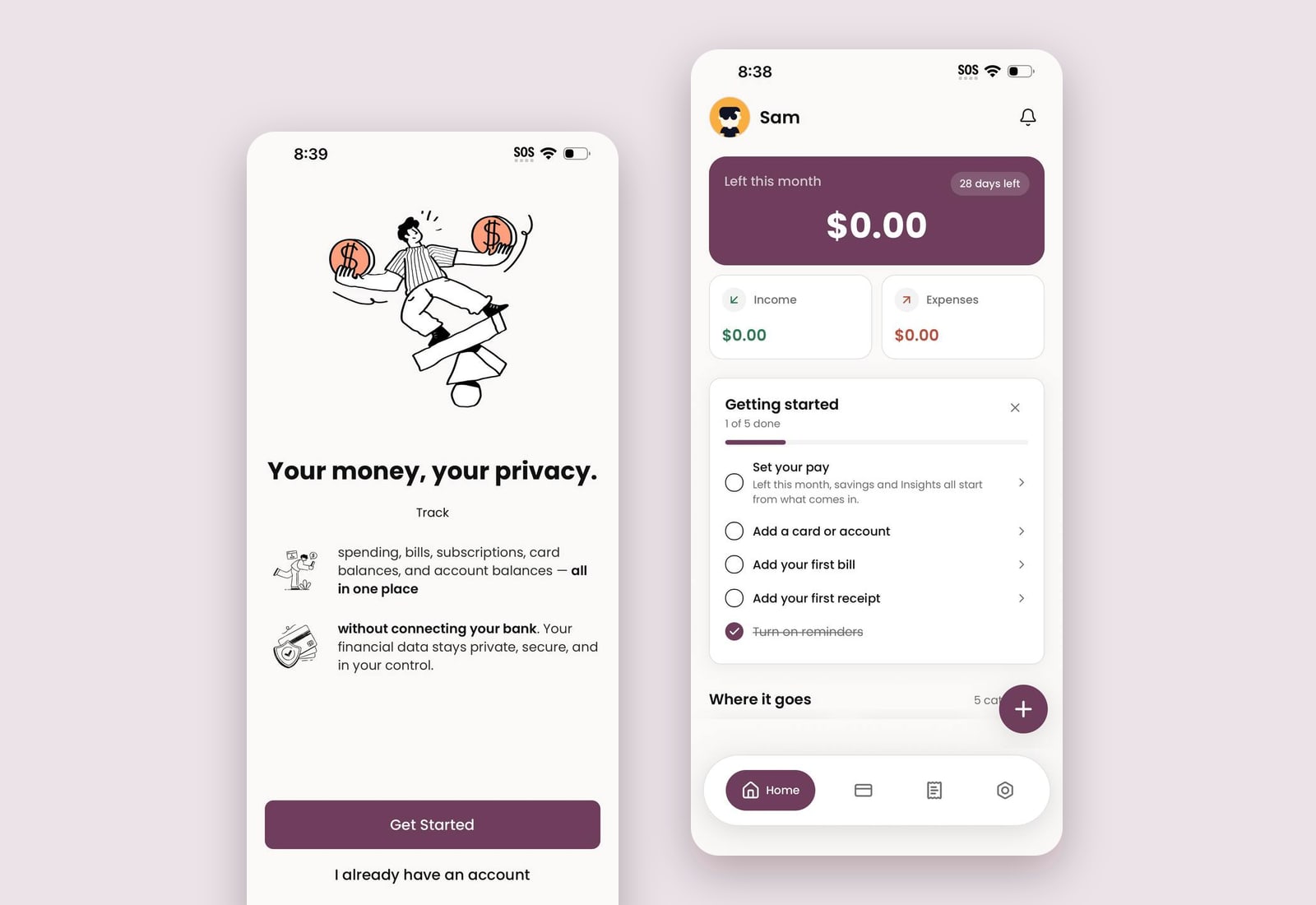
- Onboarding design: a two-screen value proposition, then a persistent “Getting started” checklist that turns an empty app into a guided setup.
- Visual system: warm off-white canvas, plum brand color, rounded cards, and hand-drawn illustrations to make money feel less clinical.
- Build: designed in Figma and developed with AI-assisted tooling; running on real devices today.
Solution
Answer the real question first, then guide the rest
The home screen leads with one number — what’s left this month — and everything else on the screen exists to make that number trustworthy.
“Left this month” hero
Income minus expenses minus upcoming bills, with days remaining. One glance answers “am I okay?”
Getting started checklist
Set your pay, add a card, add a bill, add a receipt, turn on reminders. Progress is visible and each step deep-links into the right flow.
Where it goes
Category cards (Monthly bills, Receipts, Subscriptions…) so spending is legible without charts on day one.
Recent + Coming up
A week-by-week view pairs what just happened with what is due next, so bills never surprise you.
Insights
“See the story behind your spending” — patterns and trends once there is enough data, never before.
Sign in your way
Google, Apple, or email — used only to sync across devices and recover your account, never to access a bank.
Impact
Outcome so far
Skip is live on my own devices and in testing with a small group. Early signals from testers:
Next project
ApnaUSA.coRooms, jobs, deals and events from your community, in every US city — post in three minutes with no account. Used by 25,000+ people.
Contact
Let’s build something people love.
I’m looking for a full-time UI/UX or Product Design role, and I’m happy to talk about contract work too. The fastest way to reach me is email.